There are plenty of articles about different remote set ups written by people who work remotely, as I have been for many years now. UPDATE: I have published a new article about the evolution of the set up described here. Please read it after this one.
As a home based but frequent short-term traveler kind of remote worker I have 3 basic set ups:
- My home office, either at my place close to Málaga or in La Palma, Canary Islands, Spain.
- My (lightweight) travel set up, which is the one I use when on the move, or when I am working at a place just for a few hours or a couple of days maximum.
- What I call the “remote office” set up, which is the one I use when I work from the same place for more than a couple of days. This is the set up this article is about.
Use case
Frequently I travel to a specific destination for a week or two. The typical scenario of this “remote office” is a trip to an event or to work at a customer’s office and extending the trip to visit that particular place. It might be just about spending a week or two in a city I want to learn about, while working from an apartment, usually rented through AirB&B. Some years ago, I established the following requirements for my “remote office” set up:
- Lightweight
- I should fit it in a mid size backpack.
- Two screens.
- All devices should be chargeable through USB
- Good speakers and camera so there is no (or very little) difference between this set up and my home office one when it comes to video calls.
- Hands free so I can wake up and walk while in “camera-off” meetings.
Over the years I managed to, step by step, fulfill these requirements. Since then my goal has been improving the set up.
The set up
The picture reflects the (mostly) default set up including these elements:

- 1st generation of the Slimbook Executive 14″ laptop and charger
- U-perfect portable screen 15″.
- Tripod + screen holder/adapter.
- Laptop base
- Krisdonia external battery 50k mAh.
- This is a multipower and multiconnector external battery, suitable for many different type of devices.
- AC to DC charger and a half meter long cable with a couple of adapters to charge this Slimbook as well as other devices I have.
- USC-C to USB-A (4 ports) hub.
- Webcam: similar to the one I have at my home office. The mic is very good.
- Lamp with battery (USB-A port) and a clip. Most places I work from does not have suitable light for working.
- Jabra device (speaker + mic). I use it also in my (lightweight) travel set up.
- JBL headset (bluetooth)
- Foldable keyboard
- Ergonomic mouse. This mouse is not the default one but the backup one.
- Mobile phone. My current one is a Samsung Galaxy A71
- USB cables: one extra long USB-C for the monitor, a couple of multi connector cables for different kind of devices and several USB connector adapters (not present on the picture).
- Big mouse pad: lightweight (not on the picture). Sometimes the tables are transparent or have glass and mouses don’t work.
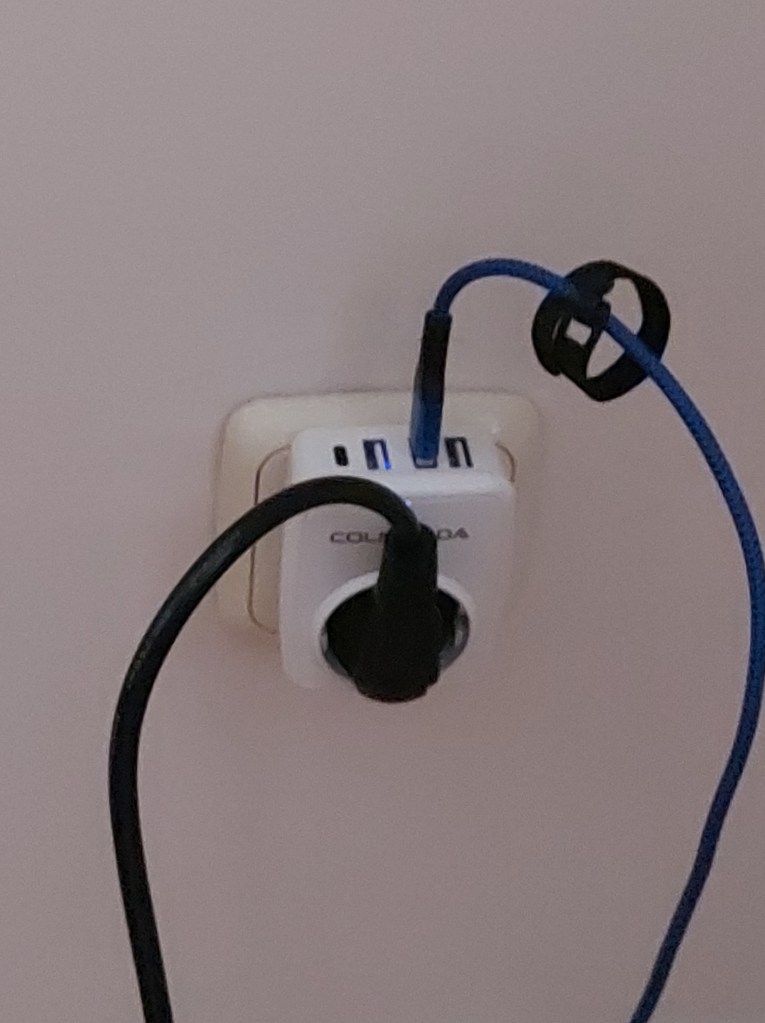
- AC to USB adapter to charge the laptop and the screen, together with other devices (check the second picture)
- I have a similar device but for different plug formats and currents/voltages (international traveling).
- My glasses, the most sensitive point of failure 🙂
- Remarkable2: an essential device for me (not in the picture)
- USB stick 64Gb (not in the picture)
- External SSD 2 TB hard disk for backups (not in the picture)
The laptop is a beast. It is the third Slimbook machine I have. It combines power, design, lightweight, first class screen, connectivity and long battery life (better the new generation than this original one). This Christmas I will get myself a new Slimbook notebook. This one has served me well for the last three years. I will still use it as my back up laptop for another three years (hopefully). As remote worker, you know that you will put your laptop to the test. Delicate ones will not survive. This one has been worth it. The latest generation Executive model is even better. I am looking forward to use it.
The Remarkable2 tablet has become an essential element for any of my set ups. I simply cannot imagine myself any more without it. I carry it with me all the time.
I was skeptical about the Jabra device at first, so I played conservative in terms of cost. It has been a great addition, not only because it works for both set ups (travel and remote office) but because it allows me to move around the apartment I am working from while at meetings. In most places you end up working seated in chairs that are not suited for several hours of work. Standing up and walking becomes essential and the Jabra device is great for this (sound and mic quality, battery, USB plus Bluetooth connectivity, easy to configure and manipulate, small and lightweight…).
The JBL headset is specially designed for wearing them while playing sports. In this set up I use them as I do with the Jabra device. They have proven essential for the remote set up so I always carry them with me. The quality and the battery are the main highlights. They were expensive when I bought them. Not so much now.
The hardest element to master has been the second screen. After a lot of reading, searching, asking other remote workers and tests, I went for this U-Perfect screen, a tripod for mobiles and a tablet holder that fits perfectly this screen. The three elements are lightweight, easy to mount and unmount and they all fit in a small plastic bag so they are easy to carry. Two details are relevant: stability and the height adaptability. You will work on different chairs and tables. Screen and laptop heights should be adapted so you work comfortably for hours.
The laptop base is a popular one. I have been using the same model for several years. The one in the picture was bought recently but I still have the original one, which should be +10 years old. It is extremely lightweight and foldable, still solid enough to support a heavy laptop, significantly heavier than my notebook.
The plug with USB ports is an essential gadget, not just in this set up but also in the remote one. I use it to charge my mobile too at nights etc. Read carefully the specs when buying these type of devices. There are limitations on the amount of power they are able to deliver. Do not go cheap here.
Remote office set up evolution
I am in constant search for improvements. For instance, I am moving towards a USB C only set up. It will allow me to reduce the number of cables and overall weight, which is always a great thing. It is more expensive that it might seem though, so it is a step by step evolution for me.
I am looking forward to remove the webcam from this set up. Maybe with my next Slimbook laptop….
The next change will be the USB hub. I want a USB C only one. I am figuring out the adapters I will need in order to charge my remaining USB-A devices though. Maybe I will need to use the laptop USB-A port to charge some of the devices until I upgrade them. We’ll see.
My default mouse (USB C port and battery) is fairly big. I would like the next one to be ergonomic, as the one from the picture, Bluetooth (unlike the one on the picture), USB C and including a good battery life. In general those are expensive mouses and, when you travel, you need to be prepared to loose or break them. After I broke my first very expensive mouse, I realised that it was not worth the cost for me. Something similar happens with the headset. At some point, the one I have will break or I will loose it. Is the risk worth the expense?
I am extremely happy with the external battery. It is obviously heavy so I always need to think twice if I will carry it. I have a smaller/lighter version of it (20k mAh). In this set up, this battery gives me freedom to work from any place in the apartment since I can connect the laptop and the external monitor to it. I sometimes carry an stencil instead of this battery but I love the flexibility this multi-power and multi-port device provides me so I can combine the “travel” and the “remote office” set ups in a single backpack. Have you been at an airport or a cafeteria looking for a current plug? Yes, you know what I mean…
As years passes by, batteries become lighter and more powerful so this is an item in constant evolution. The fact that this model provides different combinations of current and voltage makes it essential to me. I also carry a small battery for my phone and remarkable2 tablet, like most of you do.
I am an openSUSE Leap and KDE user. I guess I will have to move to a different KDE based distro since Leap is reaching “EoL”. One day I will write about the software I use as remote worker.
I use the lamp on the picture to read on my tablet as well, not just on this set up. This lamp is not the best one. It is simply the one that have better survived over the years. Most of the ones I have tried are so delicate… I have a bigger and more powerful version of it but I only carry it when traveling with my van. I would like to find a more powerful version of this one, as flexible as this model, USB C port instead of USB-A and a good battery life. By the way, one day I should write about some of the gadgets I carry to work from my van.
My next Jabra will be a higher end one. It is a great device. It is also useful in audio/video conferences at events, where there are several people at you end. Just pair it to your phone and voilá!
I am very happy with my portable monitor. It has been a game changer for me. My next one though should have a higher resolution. I would love it to have a battery too, but they become too heavy. It is not worth it for me. Another option I am investigating are the monitor extenders. I am looking for models connected to the laptop by a single USC-C port and lightweight enough so I can use my current base to adapt the laptop height, together with the extender, to my eyes level. Check this video to learn about these devices.
Making encrypted backups of my key information is an essential activity, specially before and while traveling. I have broken my laptop while traveling, have run out of disk space in the worst moment or simply have lost the external hard disk. There are plenty of situations where an external USB hard disk for encrypted backups becomes essential. The fast, low power consumption ones are expensive. The specific USB cable is another point of failure to consider. You also have to buy a good case to protect them. This is a point in constant evolution I pay attention to.
Over time I have found that good quality cables are worth it. They are expensive though so it is always a question of risks vs price. I tend to carry a couple of good ones and a couple of cheaper ones. But every time I loose or break a good one… it hurts.
I have been using this Moko foldable Bluetooth keyboard for years. It is falling apart now. I have tried small Bluetooth keyboards, USB ones, other foldable ones… and I ended up coming back to this one, which you can still buy. It is great. I would like my next keyboard to be foldable, with battery too, but with a USB C port, as long/wide and with at least the same keys size as the current one or even longer/bigger, ergonomic and Bluetooth, like the Moko one… and mechanical. 🙂 I know, I ask for too much, but hey!, maybe a keyboard designer is reading this article.
I am testing a Portable Router. The idea is to securely connect several devices to my own Wi-Fi. Currently my devices get too exposed to hackers, especially the phone. I would also like to use a VPN on regular basis from the router itself. This device is small, lightweight and functional. Its OS is openWRT, which means that is extremely powerful and versatile.
Ah, and in my wish-list I would also add a lightweight and foldable ergonomic seat and backrest. I haven’t talked about the backpack or the different cases I use to carry this set up. This is another interesting topic to cover… in a future article, maybe.
Conclusion
Every time I travel and work from the same place for more than a couple of days I carry with me the “remote office” set up. Weight and space are essential restrictions to always keep in mind in this set up. I keep evolving it so if you have ideas or potential improvements do not hesitate to share them as comments or directly to me.
In general, there are no secrets, the more money you spend, the better quality you get. I have found though that it is not worth spending much money in several of these articles when traveling frequently, given the risks of loosing or breaking them. Reliability is essential when working away from your default office.
Each one of us is different, with different needs and expectations, so take this article just as reference. It is what I’ve done with other similar articles I have read. Reddit has been a great source of information for me (digitalnomad tag).
UPDATE: I wrote a follow up article describing the evolution on this set up. Check it out.
 toscalix
Hi!
Very interesting seeing how you’ve been able to pack so much in such little space.
I’m wondering what do you use the Remarkable for? Note taking?
Thanks!
LikeLike
I use it to take notes, to sketch, create diagrams, write tasks early in the morning, as eBook reader, to read blog posts I send from the browser….
LikeLike
About money and quality is not always truth. See MS Windows and OpenSUSE. I think Tumbleweed with Plasma5 is a lot better..
LikeLike
I agree, which is why I said “In general….” About Leap vs Tumbleweed… they target different user groups. I am not a target user for Tumpleweed but for Leap, given my technical skills and the needs for newer software vs stability
LikeLike