Back in November 2023 I wrote an article describing my three working environments and the setup for one of them — what I call my remote office. At the end of that article, I mentioned how this setup was evolving. This article explains that evolution.
New Laptop
I bought a new laptop in November 2023. The old Slimbook Executive still worked well, but its battery did not last long enough for heavy travel. My backup laptop was also no longer reliable for trips. So I bought a new Slimbook Executive 14″ black with 64GB RAM and a much better battery. It’s a great machine — more powerful, slightly bigger and heavier than the old one, but nothing significant.
Moving to USB-C
As I mentioned before, I’m moving toward USB-C only. I no longer carry a pouch full of different cables. Now I carry four USB-C PD 3.1 cables for charging and connectivity, plus a few adapters for older devices. Every new device I buy now supports USB-C — with one exception, which I’ll explain later. Some older devices still need adapters: the foldable keyboard, the Jabra speaker, the travel router, the portable monitors, and the external hard drive. These adapters are easy to lose, so I always carry more than I strictly need.
I also added a couple of “USB data blockers” to my kit. They prevent “juice hacking” when charging in public places like airports or events.
From one to two portable screens
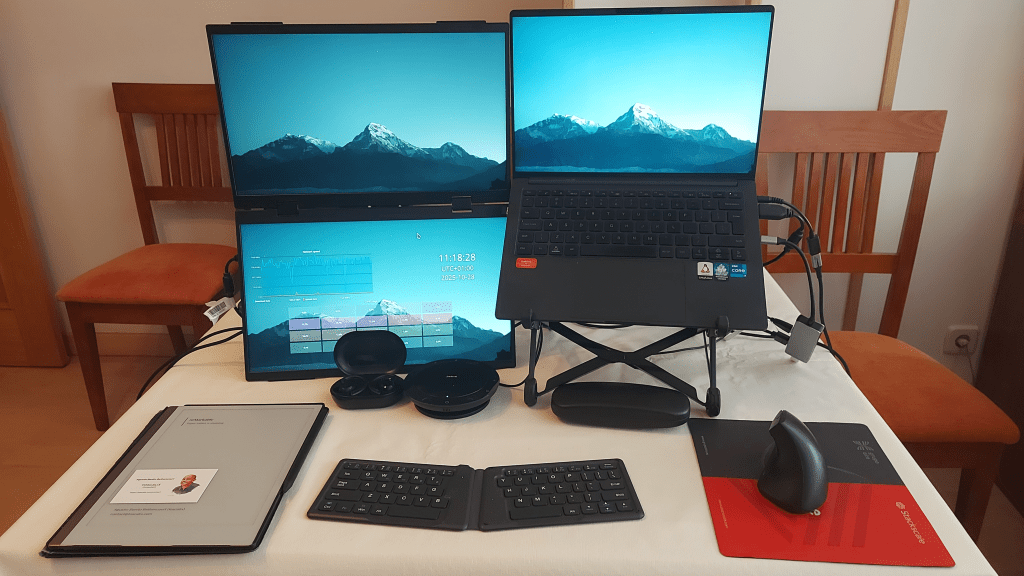
In my previous article, I used a 15.6″ UPerfect portable monitor with a tripod. Now, I’ve upgraded to a dual foldable portable monitor (1080p, 360° rotation, VESA compatible) from CUIUIC.
Advantages
- I can now have up to three screens (laptop + two external). I can also use only the external ones, which is useful in some situations.
- I can show my screen to others in small meetings or at events without a projector. I just fold one screen toward them.
- The foldable format protects the screens better, and my laptop case is thinner and lighter.
- I carry one item instead of two (no tripod needed).
- It takes less space in my backpack.
- Setup is faster — no tripod to mount.
Disadvantages
- It’s a bit heavier than the previous setup.
- It’s also more expensive, but not by much since I don’t need 4K or touchscreen support.
This foldable dual-screen device can connect both screens through a single USB-C cable. Unfortunately, I’m still trying to configure that on openSUSE Leap 15.6. My knowledge of Thunderbolt and X11 is limited, so for now I use one of these options:
- Connect each monitor separately via USB-C.
- Use Mini HDMI for video and one USB-C for power.
The device comes with two nice USB-C to MiniHDMI cables But, as I experienced the hard way, they are hard to find. If you forget them, as I did once, or loose them… So I bought MiniHDMI-to-HDMI adapters together with a couple of simple HDMI cables. That is the set up you can see in the picture.
Later, I switched to connecting both screens directly by USB-C, saving the adapters and HDMI cables. My laptop has one Thunderbolt USB-C port and one HDMI port, so a single-cable setup would be ideal. I hope upgrading to openSUSE Leap 16 (and moving to Wayland) will make that easier.
The charger
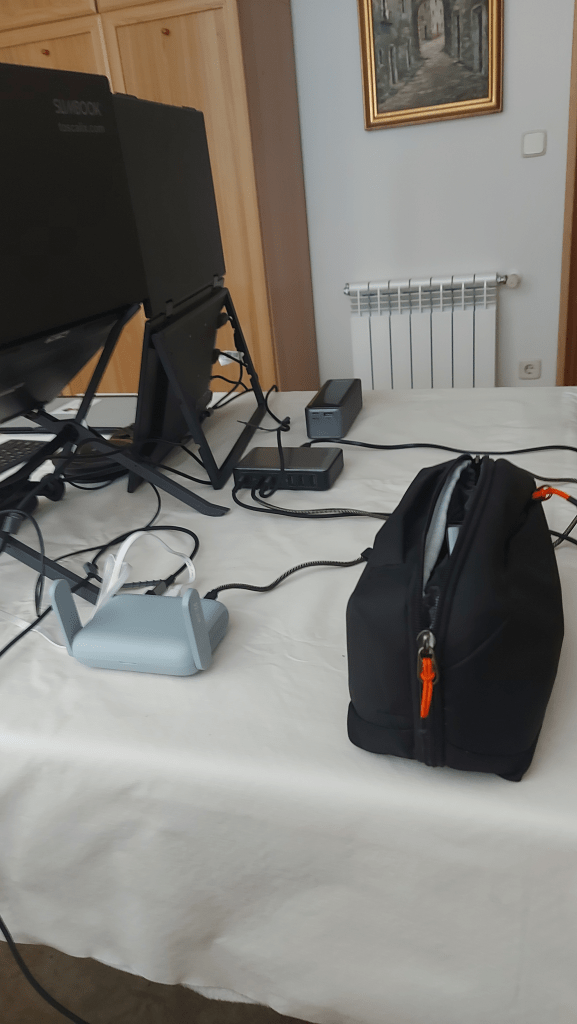
If I had to name one upgrade that made a big difference, it would be this: the 300W 8 ports charger. Yes — even more important than the laptop. At first, I bought it just to try it out. Now it comes with me now wherever I go.
This charger has enough power for my 90 W laptop, using the USB-C port, that provides 100 W. I can charge the laptop even while using it. I also bought a couple of USB-C to DC5.5×2.5mm adapters. It took some time to find one that really support 100 W. I use this charger for everything — phone, Remarkable 2, toothbrush, both portable screens, etc. I no longer carry the original laptop charger or the old small plug shown in the previous article.
One hidden advantage is the standard wall cable. It’s easy to replace and buy anywhere. When I travel to the UK or Japan, I simply carry region-specific power cables or a simple plug adapter instead of a heavy universal adapter. It should also work in the US based on the input specs.
So this charger replaces my laptop charger, multi-device plug, and travel adapter. However, it gets quite warm when charging several devices at once. It has overheating and overcharging protection, but I still avoid leaving it unattended at full load. There are smaller and more powerful models available. I’ll probably buy one soon.
The portable router
Another new item in my setup is the portable router, mainly for security reasons. I used to carry a MiFi device for 4G, and later I used my phone as a 5G hotspot. But I often work in places where I don’t trust the local network — cafés, hotels, AirB&Bs —, they do not trust my machine (customers sites), or where I need to use a VPN.
I ended up buying the GL-MT3000, a simple and lightweight router that runs OpenWRT. It’s a fantastic little device. I connect my laptop and phone with cables and, when I’m at an apartment or trusted place, I enable Wi-Fi with my home configuration (which is pre-defined in the router) and everything just works. I use it far more often than I expected.
If you plan to buy one, consider the version with a built-in battery. It’s not needed for my remote office setup, but it’s very handy when working on the move.
Other devices and improvements
The laptop camera is now better. Enough for me to drop the webcam for most meetings. I still carry the webcam when I know I will have an online event or a public talk, since the quality of the laptop one is yet not equivalent. In general though, I do not carry the webcam anymore.
My foldable bluetooth keyboard looked like very old, although it worked like the first day. After trying a couple of other models, I ended up buying the same one again, the Moko Foldable Keyboard. It’s not USB-C, but it’s the best of its kind, in my opinion.
I love my Bose headphones but I stopped traveling with them — they’re too big. After losing or breaking expensive running headphones, as you could see in the previous article, I now buy cheaper ones. On this “remote office” set up I still use the Jabra 510, but the small headphones are great for travel or daily use.
Things that can get lost or broken will eventually do so. Headphones are one of those items where I no longer spend much money.
Yes, I still have my Remarkable2 — almost five years and counting. I use it every day. I even wrote this blog post with it.
My laptop stand is the same. It still works perfectly — one of my best purchases.
I replaced my clicker with a Norwii N99 It’s rechargeable through USB-C, so no more AAA batteries. The same goes for my mouse — now a ONELY ergonomic vertical USB-C rechargeable mouse. These devices break or get lost easily, so I don’t spend much on them either.
Now I use one larger pouch for all cables, adapters, peripherals, and small devices instead of several small ones. The external battery has its own case, as does the Remarkable 2 pen. The charger and portable router share another case. In general, I have reduced the number of items I carry. As my glasses remain as the biggest point of failure, the case is more solid now.
External battery
Although not critical for the remote office, I upgraded my external battery too. With high-power laptops (over 65 W), many batteries only charge them when they’re turned off. I wanted one that could power my laptop while in use and was smaller (even if heavier).
This new external battery bought on Christmas 2025, is outstanding. Airport security often checks high-capacity batteries, so be ready for that. This one powers all my devices while they’re in use — perfect for travel, even if not essential for my remote office setup.
Conclusion
My remote office setup is now lighter, more USB-C oriented, more security oriented, and slightly better suited for working anywhere — with fewer packages, fewer cables, and new tools.
To be honest, having three screens instead of two makes little difference for me, except in video conferences. If you’re happy with one external screen and tripod, you don’t need this upgrade unless three screens really help you, or you share any of my use cases.
I get some of the ideas for my “remote office” set up from Reddit [1][2][3]. If you have any further suggestion or question, please let me know. I am always willing to learn from others. Please check my previous article about this topic for elements I do not talk about in this one. Most likely, they have not changed.


Interesting write-up, thanks for sharing!
That folding screen idea is kind of tempting; multiple displays is definitely what I miss most when traveling away from my home setup.
LikeLike